Color Block Jam Level 2041 Walkthrough
Compare the starting board for Color Block Jam Level 2041, then use the recorded checkpoints and illustrated strategy notes below.
Video source: YouTube · Kamel Tutorial. Watch original recording
Starting board and recorded checkpoints
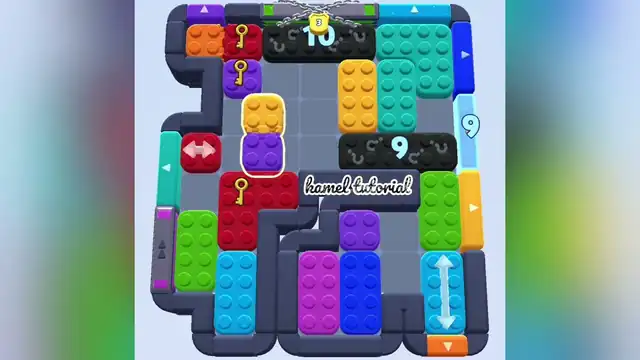
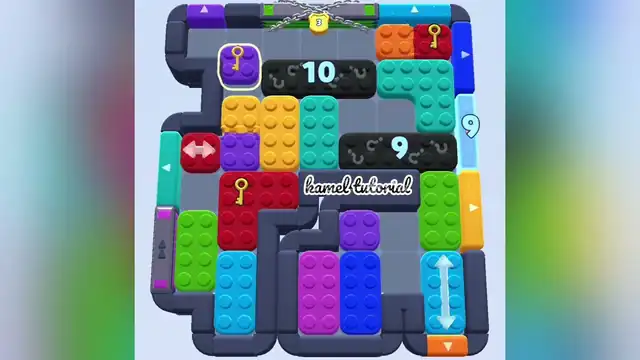
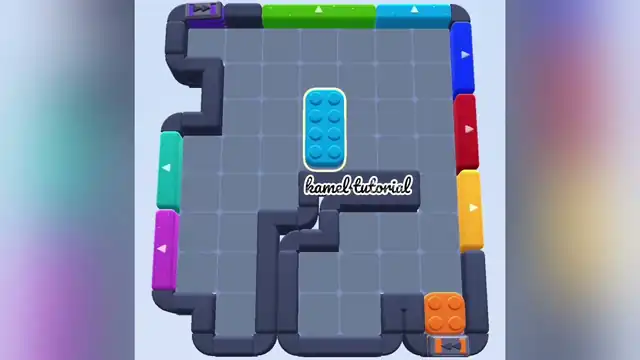
The creator thumbnail is the title card plus a full board: black blocks read 12 and 11, a light-blue 11 sits by the right edge, and four key blocks are visible. The padlock digit on that thumbnail is not readable. The first preview still is gameplay: black blocks read 10 and 9, the side number reads 9, the padlock reads 3, three key blocks are visible, and a yellow-on-purple stack is selected in the open middle. The second preview still keeps 10, 9, side 9, and padlock 3; the selected piece is now the purple key block, and the red key block is at the upper right. The lower half of frames 1 and 2 looks the same. The third preview still is nearly empty: only a selected cyan vertical block and an orange square remain, with gates still around the border. No completion screen.
Creator-labelled Level 2041. These are YouTube's three automatic preview stills from the Kamel Tutorial recording (1:39), in frame order, not measured pause times. The frames do not show the in-game level counter, and a kamel tutorial watermark is on the gameplay stills. A completion screen has not been verified in these stills. The first preview still shows the red square with a gold key at the upper left. Selected checkpoints, not a complete transcript and not independently replayed. Reviewed: 2026-10-19.
Video checkpoints and movement notes
These are selected recorded checkpoints, not a complete move-by-move transcript. Stop if your board or available exits differ.
| Video time | Action / focus | Result / what to check |
|---|---|---|
| Thumbnail | Red square with a gold key under the chain and black block printed 12 are beside the Level 2041 title card. | The yellow 2041 on that card is title text, not the in-game counter. |
| Still 1 | Red square with a gold key at the upper left and purple square with a gold key below it are the opening state to match. | Top chain with a gold padlock printed 3; top purple left. |
| Still 2 | Purple square with a gold key, outlined, at the upper left and red square with a gold key at the upper right are the later state in the second preview still. | Top chain with a gold padlock printed 3; top purple left. |
| Still 3 | Cyan vertical block outlined in yellow in the center remains in play on Level 2041, with no reward card in this still. | Top green up; top blue up. |
1How To Clear Level 2041
- 1.Level 2041 starts beside the title card with red square with a gold key under the chain and black block printed 12.
- 2.Match the opening still to red square with a gold key at the upper left and purple square with a gold key below it before you treat a later still as the start.
- 3.The second preview still has changed to purple square with a gold key, outlined, at the upper left and red square with a gold key at the upper right.
- 4.Cyan vertical block outlined in yellow in the center remains in play on Level 2041, with no reward card in this still.
Still stuck on 2041?
Check the opening screenshot and the relevant video checkpoint against your own board. If the block arrangement differs, use the planning tips rather than copying a move that is unavailable.
!Pro Tips
- •The padlock digit on the creator thumbnail.
- •Do not assume the side 11/9 is a HUD timer or a gate counter rather than a printed number beside the right edge.